
Mulebuy agent order checklist: keep spreadsheet context into the order
Most expensive order mistakes are boring: wrong link, missing size note, or no QC plan. Use this checklist when you move from a Mulebuy spreadsheet shortlist into the agent cart.
Why spreadsheet finds still need order notes
A spreadsheet row is a candidate. The agent purchase needs an exact source URL plus options the seller will understand. If the row and the live product page disagree on size chart or color name, pause before you pay.
Pair this page with the agent-order-notes guide when you need the longer handoff story; stay here when you want a tick list per item.
Per-item note template (copy before you pay)
Fill one row per shortlist item. If a cell is blank, you are not ready to submit payment.
| Field | What to write | Fail if… |
|---|---|---|
| Source URL | Weidian / Taobao / 1688 / Xianyu link that opens the exact listing | Mirror, dead link, or wrong variant page |
| Options | Size + colorway + quantity in seller language if needed | “Same as photo” with no size |
| Price check | Live page price vs spreadsheet expectation | Silent jump you cannot explain |
| QC plan | Angles / measurements you will demand | No plan because “standard QC is fine” |
| Remarks | Measure insole, remove box, extra photo, etc. | Custom ask only in your head |
| Screenshot | Listing saved for later album compare | Only a spreadsheet thumbnail left |
Before you submit payment
Run this block once for every item that still has a blank in the template above.
- Correct source link — not a dead mirror
- Size, colorway, and quantity written explicitly
- Price on the page still matches what you expected
- Remark for custom asks is in the order field
- Screenshot of the listing saved for QC comparison
- Shortlist still has one written reason per item
After the item hits the warehouse
Status usually moves purchased → seller sent → warehouse received → QC photos. When photos land, open the QC checklist — do not jump straight to parcel submit.
- QC album opened with the angles you already decided you need
- Measurements checked against the chart if fit was the buy reason
- Weak items removed before they inflate volumetric shipping
- Haul budget still works after the current quote
Hand-off to shipping
Only then consolidate. Buyer shares often show tax-free EU lines and US UPS quotes changing with weight — your line list will differ, so re-quote every time the haul changes.
Next: shipping risk checklist for destination habits, then the shipping cost guide for weight math.
Common order-note failures
These habits create most expensive agent-order regrets. Catch them before payment, not after warehouse photos land.
- Failure: paste the spreadsheet title instead of the product URL → Fix: open the live listing and copy from the address bar.
- Failure: size only in a Discord message → Fix: put size in the agent order field.
- Failure: QC plan invented after photos arrive → Fix: write angles in remarks before purchase.
- Failure: keep every maybe because “already paid” → Fix: RL/cut in warehouse; shipping is still optional.
Diagrams & notes
Keep reading
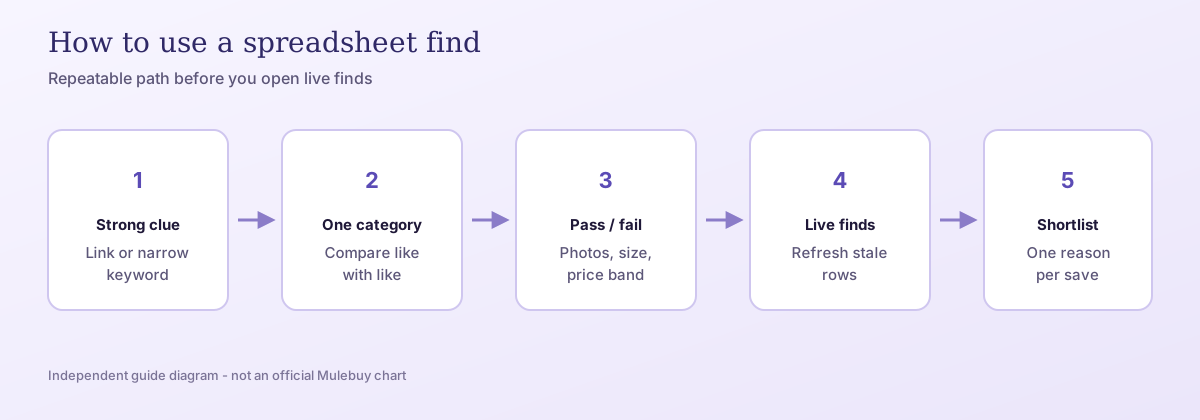
How to use a Mulebuy spreadsheet in 2026: paste a product link or tight keyword, compare in one category, pass/fail before you save, then browse live finds. The main process guide for spreadsheet shopping.
Mulebuy Spreadsheet Search Guide 2026 | Match Clue to Next StepMulebuy spreadsheet search guide 2026: map “mulebuy spreadsheet”, brand pages (/brands/), CSSBuy/Sugargoo comparisons, product links, QC, and customs queries to the right next step.
Mulebuy QC Photos Guide | What to Request & CompareMulebuy QC photos guide: which warehouse angles to request by category, how to compare them to your saved find, and when to reject before shipping fees feel sunk.
Mulebuy Shoes QC & Sizing Guide 2026 | Pair ChecksDecision topic for mulebuy spreadsheet for shoes: compare sneaker finds, sizing, pair QC photos, and shipping weight — then browse the shoes category.
Mulebuy Hoodie QC Guide 2026 | Fit, Fabric & PrintDecision topic for mulebuy spreadsheet for hoodies: fit, fabric weight, print placement, QC checks, and how hoodie hauls affect shipping — then browse the hoodies category.
Independent guide · some outbound links may earn a referral commission · we do not process payments